DEDownload
Version 1.3.1 · Windows 10 & 11 · free

All your Roblox accounts.
At once.

PHANTOM runs as many Roblox clients side by side as your PC can handle. It watches them, brings crashed and kicked accounts back and locks your logins in a vault only you can open.

PHANTOM-Setup.exe · 13.6 MB · no admin rights needed
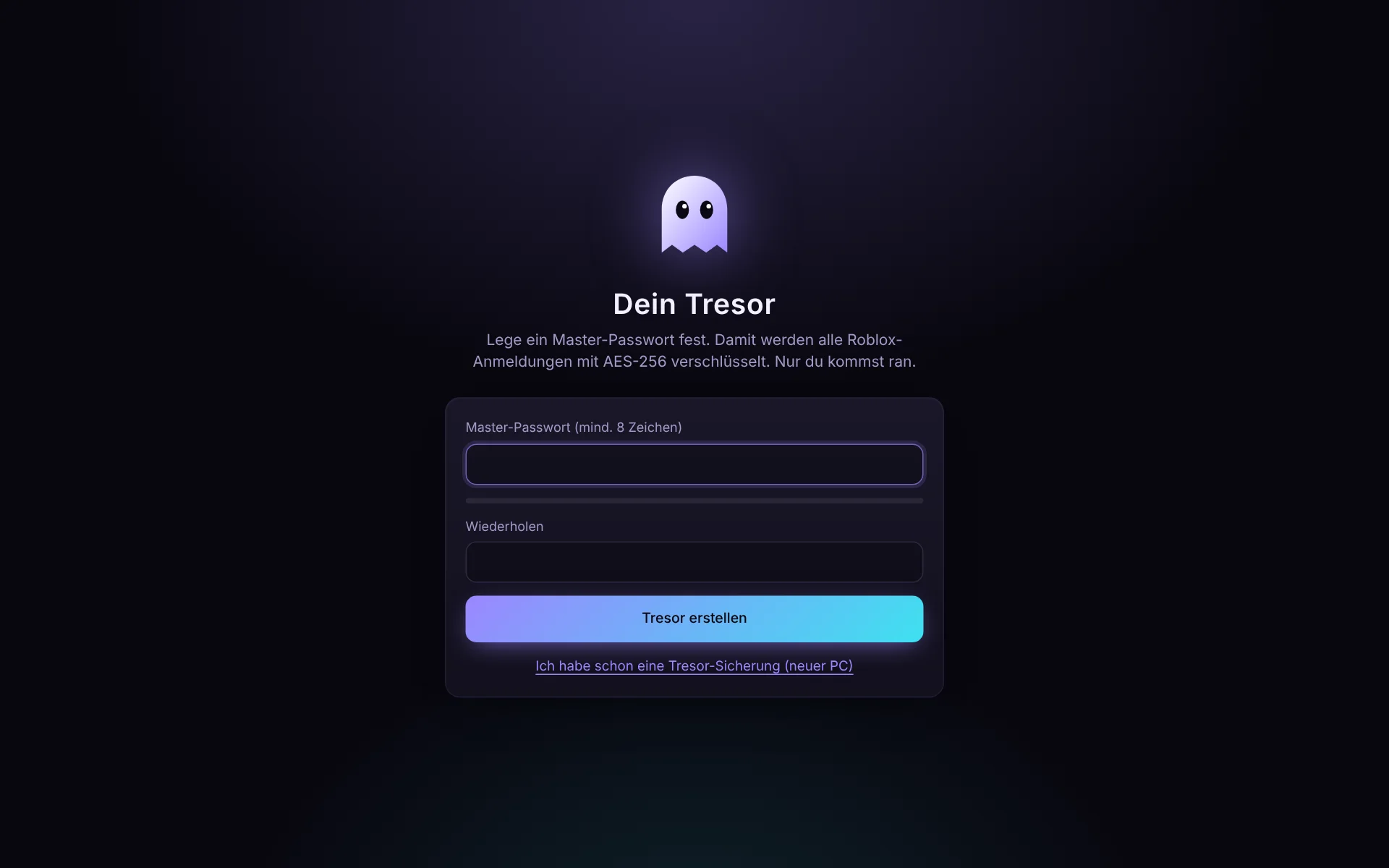
PHANTOM on first start: setting up the vault with a master password

Real view on first start. No sample data, only your own accounts. (The app itself is in German.)

Features

Everything an alt manager needs. And more.

No placeholders: every feature talks directly to Roblox and Windows.

Multi-instance

As many Roblox windows as you like at the same time. PHANTOM takes over the Roblox lock automatically.

Vault with master password

AES-256 encryption, a recovery key and automatic backups that only you can open.

Real Roblox login

Sign in on roblox.com in its own window, or add many accounts at once from a cookie list or .txt file.

Find games by name

Just type “Pet Simulator 99”. PHANTOM searches like the Roblox search bar and shows icon, creator and player count.

Auto-rejoin

After a crash, kick, lost connection or frozen window the account joins again on its own.

Performance profiles

Ghost mode at 15 FPS, CPU limit per alt, memory trimming, muted alts. Your main window stays smooth.

Server browser

Every public server with players, ping and FPS. One click sends your accounts into exactly that server.

Mini windows & grid

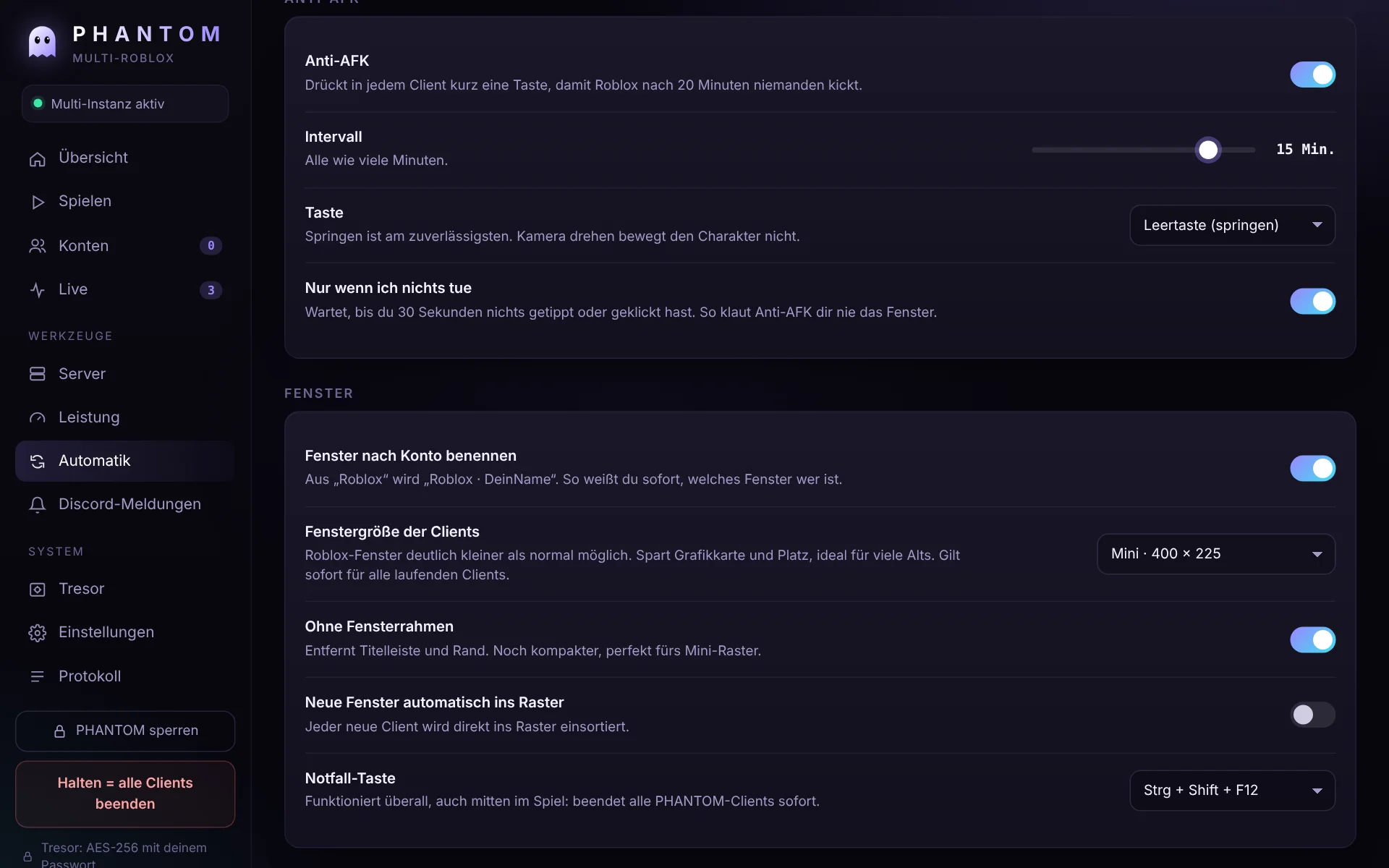
Any window freely down to 160 px wide, without title bar, tiled automatically. Smaller than Roblox normally allows.

Self-update & Discord

New version? One click in PHANTOM installs it. Crashes and kicks are posted to your Discord channel, anti-AFK prevents the 20-minute kick.

Play

Pick accounts, type a game, go.

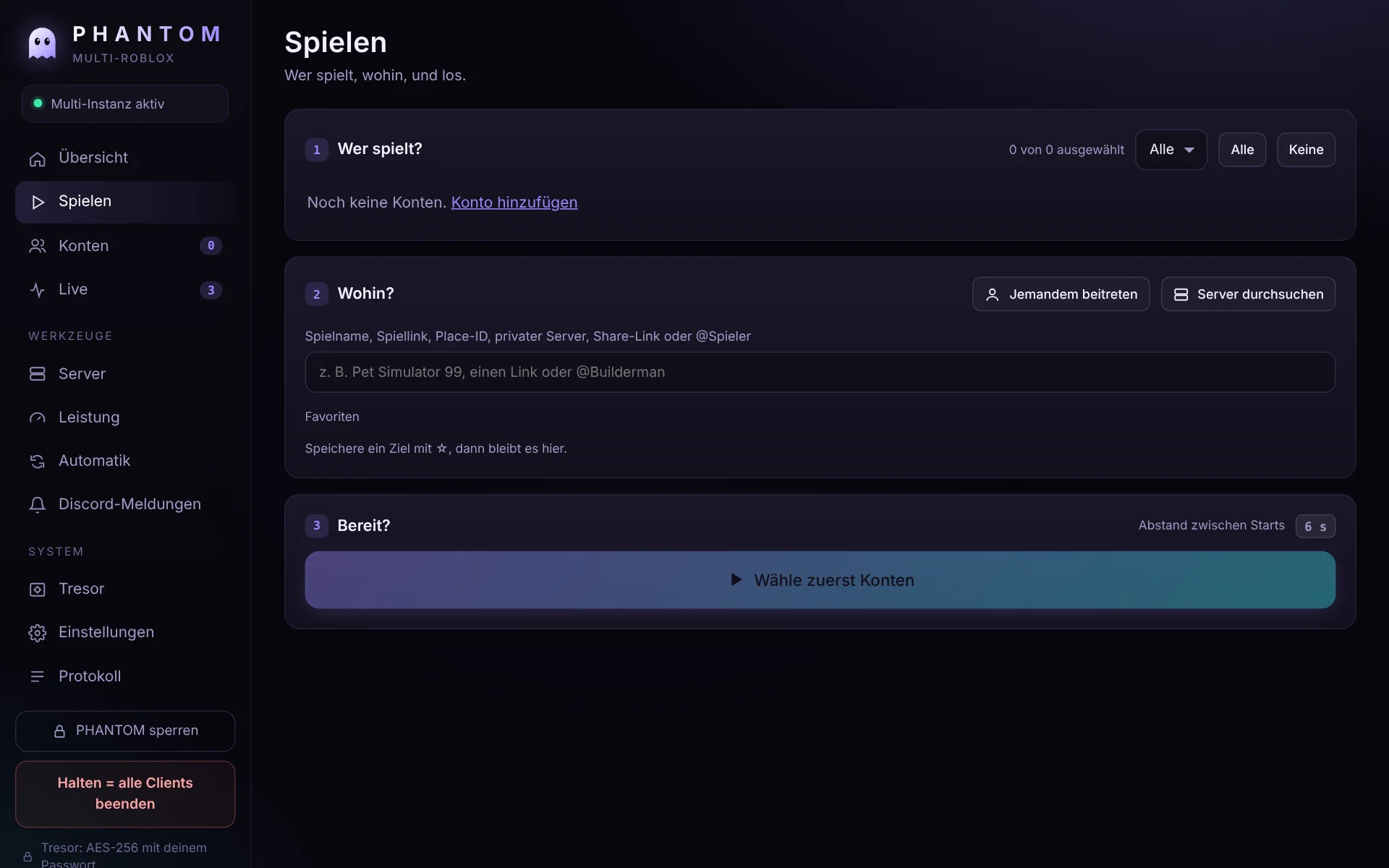
PHANTOM recognises whatever you paste and shows you where it goes before launching.

  • Game name: live suggestions from the Roblox search
  • Game link or place ID: roblox.com/games/…
  • Private servers: old links and new share links
  • A specific server by server ID
  • @username: follow a friend into their server
  • Groups like “PS99 Farm” launched with one click
Play page: pick accounts, search a game, launch
Window settings with mini windows and borderless mode
Security

Your data container. Yours only.

A Roblox login is worth as much as the password. That is why PHANTOM never leaves them lying around.

  • AES-256-GCM: every login encrypted on its own
  • Master password with 600,000 rounds of PBKDF2, nothing is readable without it
  • Recovery key in case you forget the password
  • Automatic backups after every change, e.g. to a USB stick or OneDrive, restorable on any PC
  • No server, no account with us: everything stays on your PC
  • One container: accounts, groups, favourites, webhook and the full history in a single encrypted file
  • Vault view: all data of every account, live status at Roblox, every login, launch, kick and error with timestamp
  • Fix problems yourself: “sign in again”, “open in browser as this account”, cookie visible only after re-entering the password
  • Access log: every unlock attempt, wrong ones included, is recorded
  • Lock with one click or automatically, auto-rejoin keeps running in the background
Extreme mode

As many alts as your PC can take. Without lag.

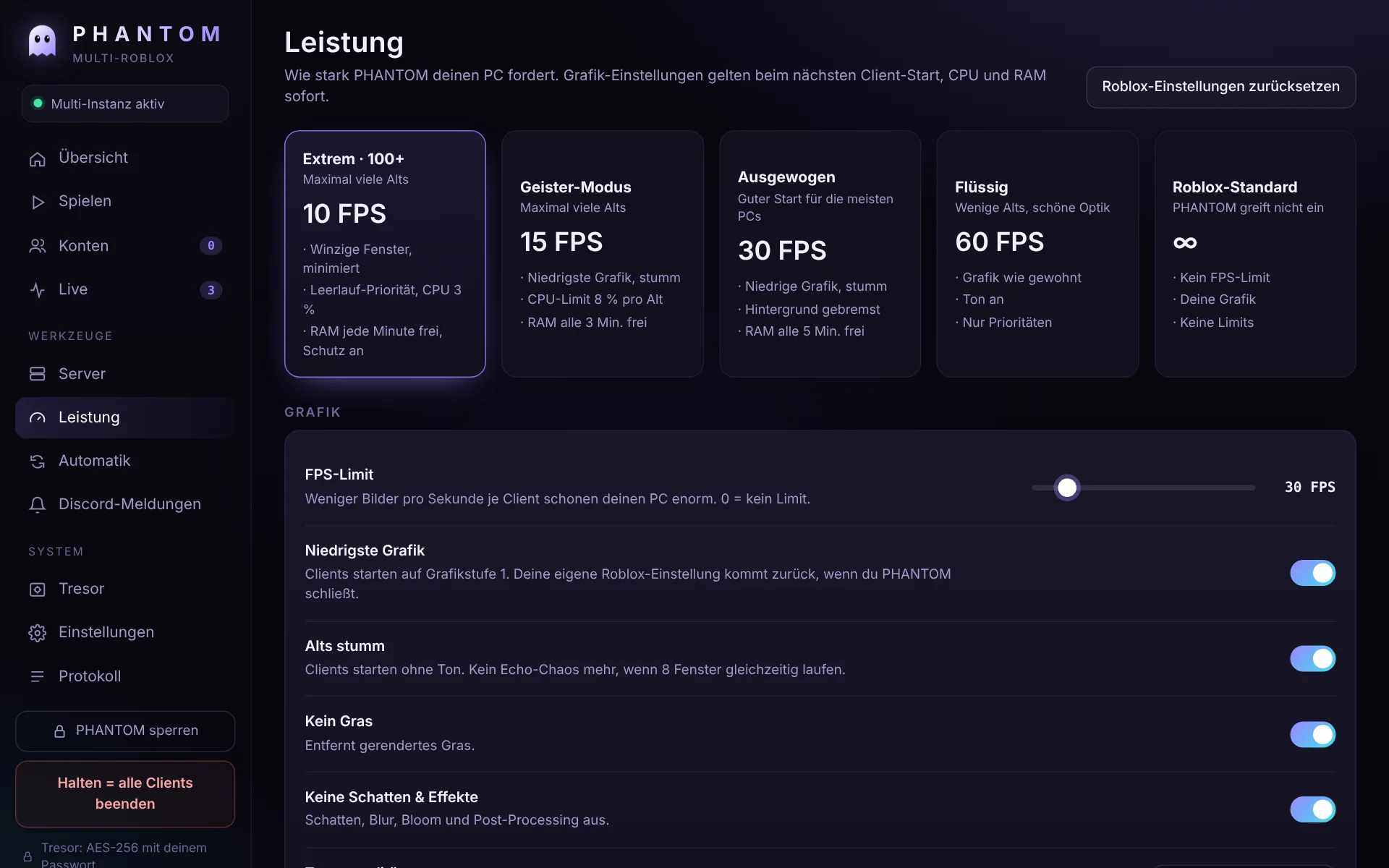
Extreme mode turns down everything an alt does not need. The overload guard only launches new accounts when enough memory is free, so your PC stays smooth. PHANTOM shows live how many more alts fit.

  • 10 FPS, lowest graphics, no grass, no shadows, muted
  • Tiny windows without frame, minimised in the background
  • Idle priority and a hard CPU cap per alt, your main window always gets full power
  • Memory trimming every minute
MemoryAlts (estimate)
8 GB6 to 10
16 GB15 to 25
32 GB40 to 60
64 GB100+

Every Roblox client needs about 300 to 500 MB of RAM, even in extreme mode. No program can get around that.

Performance page with extreme mode
Guide

Ready in five minutes

Download and install

Download PHANTOM-Setup.exe and open it. Windows may show “Windows protected your PC” because PHANTOM has no paid code-signing certificate yet. Click More info → Run anyway. Setup needs no admin rights and creates Start menu and desktop shortcuts.

Set up the vault

On first start you choose a master password (at least 8 characters). PHANTOM then shows your recovery key. Write it on paper or store it in your password manager, not as a file on the same PC.

Close Roblox

For several windows to work, PHANTOM has to be there before Roblox. Close all Roblox windows, including the tray icon. PHANTOM then shows “Multi-Instanz aktiv” in green at the top left. Best close other alt managers.

Add accounts

Konten → Konto hinzufügen (Accounts → Add account) opens the real Roblox login page. Sign in, done, the window closes itself. Many accounts at once: Cookies importieren, one line per account or pick a .txt file. Every cookie is checked with Roblox.

Play

On Spielen (Play) click the accounts, type the game name (or paste a link) and press start. PHANTOM launches the accounts one after another a few seconds apart. Live shows every client with CPU, RAM and status.

When an account has problems

Open Tresor (Vault) and click the account. PHANTOM checks it live with Roblox and shows what is wrong: signed out, banned or kicked, with the exact history. Neu anmelden renews the login, Im Browser öffnen takes you straight to roblox.com as that account.

Fine-tuning

Leistung (Performance): pick a profile, e.g. “Extrem · 100+” for lots of alts. Automatik → Fenster: mini and borderless windows. Automatik: auto-rejoin, anti-AFK, window grid. Discord-Meldungen: add your webhook. Panic key Ctrl + Shift + F12 closes all clients instantly.

Download

PHANTOM 1.3.1

For Windows 10 and 11 (64-bit). PHANTOM installs updates itself with one click.

File
PHANTOM-Setup.exe · 13.6 MB
SHA-256
7846ac3278ad6a38a82349d278d69519f9caf3a91da0aa8acd276752e7a0ece1
Requires
Microsoft Edge WebView2 (included in Windows 11)
Download
Only download PHANTOM from this site. Never give your vault backup, your recovery key or a .ROBLOSECURITY cookie to anyone: whoever has it has your account.
Versions

What's new

1.3.1 03.11.2026

  • Less RAM and CPU: when you are away from the PC for 2 minutes, the front Roblox window saves too
  • Alts get very low memory and disk priority, plus efficiency mode on Windows 11
  • Less detail on distant objects in saving mode
  • PHANTOM itself uses less: no animations or redraws while it is in the background
  • After a rejoin the new client gets all saving settings again

1.3.0 03.11.2026

  • Self-update: install a new version with one click inside PHANTOM, the file is verified first
  • Freely scalable windows: slider per window down to 160 px, borderless windows can still be resized with the mouse
  • The vault shows all logins at a glance: how many work, how many are signed out, check all with one click
  • Website in German and English

1.2.2 03.11.2026

  • Overload guard reacts to changes immediately and is tuned for normal PCs (6 %)
  • More realistic capacity estimate
  • “Last launched” is stored in the vault

1.2.1 03.11.2026

  • Multi-instance now stays active through PHANTOM updates and restarts
  • Running clients are picked up again automatically after a restart

1.2.0 03.11.2026

  • Data container: the whole file is encrypted, not just the logins
  • Vault view with all account data, live check, history and access log
  • Sign in again and “open in browser as account”
  • Mini windows down to 256 × 144, borderless, mini grid
  • Extreme mode, overload guard and capacity estimate
  • New installer: installs WebView2 when needed, autostart, checklist, uninstall window

1.1.0 03.11.2026

  • Vault with master password, recovery key and automatic backups
  • Game search by name, cookie import from .txt, installer

1.0.0 03.11.2026

  • First version: multi-instance, accounts, groups, server browser, auto-rejoin, anti-AFK, Discord alerts
SystemWindows 10 / 11
Architecture64-bit
RequiresWebView2
RightsNo admin
FAQ

Frequently asked questions

Is this allowed?

Having several Roblox accounts is allowed. Individual games can forbid multi-accounting in their own rules, so follow them. PHANTOM does not modify any game and does not hook into Roblox, it launches Roblox the same way the Roblox website does.

What if I forget my password?

Open the vault with your recovery key and set a new password. Without password and recovery key nobody can get at the stored logins, not even us. Your Roblox accounts themselves of course stay, you would just have to sign in again.

New PC, how do I get my accounts back?

Install PHANTOM, choose “I already have a vault backup” on the vault screen, pick the newest .phantomvault file from your backup folder and enter your password or recovery key. Tip: put the backup folder on a USB stick or in OneDrive (Settings).

Why does Windows warn me?

Windows SmartScreen warns about programs without a purchased code-signing certificate. Compare the SHA-256 checksum above with your file (PowerShell: Get-FileHash .\PHANTOM-Setup.exe) to know it is unchanged.

Multi-instance stays yellow

Roblox was already running before PHANTOM started. Close all Roblox windows and the Roblox tray icon. After a few seconds the indicator turns green. If another alt manager runs, it holds the lock. That works too, but one program is better.

How many accounts can my PC run?

With extreme mode about 300 to 500 MB of memory per alt. PHANTOM shows live under “Leistung” how many more fit, and the overload guard stops it from getting too many.

Can I run the alts on a free server?

Unfortunately not. Roblox needs Windows with graphics, and free always-on servers (e.g. Oracle or Google free tier) are small Linux machines. What works for free: use an old second PC or laptop as an “alt machine” and run PHANTOM there.

How do I open an account that has problems?

Click the account in the vault. You instantly see whether the login is valid, whether the account is banned, and the full history. “Im Browser öffnen” signs you in as that account on roblox.com in its own window.

How do I uninstall PHANTOM?

Windows Settings → Apps → Installed apps → PHANTOM → Uninstall. You are asked whether to delete your accounts on this PC. Your vault backups are always kept.